Controlling your email inbox is more important than most people realise. According to the McKinsey Global Institute, the average professional spends 28% of their working week reading, writing, or responding to email. That is more than a full day every week just managing messages. And research by Gloria Mark at UC Irvine found that after a single interruption, it takes an average of 23 minutes and 15 seconds to fully return to the original task.
If your inbox feels like it is running you rather than the other way around, you are not alone. The good news is that email overload is almost always a systems problem, not a personal one. Build a clear email management process, and the volume becomes manageable. This article shows you how.
The Real Cost of Email Overload at Work
Email overload does not just waste time. It hampers team collaboration, contributes to missed deadlines, and grinds down team productivity over time.
Gloria Mark’s research at UC Irvine proves that frequent interruptions, including email notifications, significantly fragment attention and increase stress across the working day. Knowledge workers, in particular, bear the brunt of this. A separate McKinsey Global Institute study found they spend nearly a third of their week on email alone, leaving far less capacity for the important tasks that actually move work forward.
The pattern is familiar to most office workers. You start the day planning to focus. Incoming emails pull you sideways before you have made a start. By the afternoon, you have responded to most of your messages but completed very little substantive work.
That is not an effort problem. It is a systems problem. And fixing it starts with changing how you manage emails from the ground up.
Step 1: Stop Using Your Inbox as a To-Do List
This is where most people go wrong.
When you leave emails sitting in your inbox because they need action, you are using it as a task manager. It is not built for that. Every time you open your inbox, your brain scans those same unread emails again and re-evaluates them. Over a full day, that cognitive load adds up and chips away at your concentration.
The fix is straightforward. When an email needs action, get it out of your inbox and onto a proper to-do list. In Microsoft Outlook and in Apple Mail, you can flag emails and move them into a dedicated task system. Your inbox stays clear. Important tasks live somewhere they can be properly prioritised and given immediate attention when needed.
Your inbox is for communication. Your to-do list is where work lives. Keep them separate, and you will make fewer mistakes, feel less overwhelmed, and spend significantly less time rereading the same email.
Inbox zero does not mean an empty inbox every single day. It is an email management methodology, not a daily scorecard. The point is that nothing sits unresolved indefinitely, and every message receives appropriate action.
Step 2: Build an Email Routine and Stick to It
 Most Australian workplaces have an unspoken rule that emails need a fast response. That expectation — real or imagined — keeps people tethered to their inbox all day and makes deep work nearly impossible.
The alternative is batching. Set dedicated email blocks at fixed points during the day rather than checking messages continuously. Morning, midday, and late afternoon after your first priority task work well for most roles. Outside those windows, close the tab and turn off email notifications on your phone and desktop.
Turning off notifications is not optional if focus matters to you. Constant alerts from incoming messages do not just break concentration; Gloria Mark’s research shows they increase cognitive load over time, making it harder to think clearly even during the gaps between interruptions.
A consistent email routine also makes it easier to keep your inbox clean between sessions. When you only check emails at set times, you process with intent rather than reacting to whatever arrived most recently.
If you use Outlook, enable Focused Inbox. It automatically sorts incoming emails into two tabs based on relevance, reducing the visual clutter competing for your attention. Most other email clients, including Apple Mail, offer a similar filtering feature worth turning on.
Gmail users have their own version of this control. Send and Archive removes an email from your inbox the moment you reply, so read messages don’t sit there re-competing for attention. Delayed delivery, available in both Outlook and Gmail, addresses the problem from the other direction: instead of managing when you check incoming mail, you manage when it arrives in the first place, so nothing lands mid-focus block and pulls your attention sideways.
If you change your habits, communicate it. A short note about your response window in your signature or Teams status manages colleague expectations without any difficult conversations.
Step 3: Create Folders That Match How You Actually Work
Most folder systems fail because they are overcomplicated. People create folders based on every project, client, and topic they can think of, spend more time filing than working, and give up within a fortnight.
The better approach is to create folders based on the action required, not the subject matter. Five is enough to keep your inbox clean and organised:
- Action Required — needs a response or further action from you
- Waiting On — you are expecting a reply or action from a team member
- Reference — no action needed, but worth keeping for later
- Read Later — newsletters, reports, and low-priority reading
- Archive — processed and kept for records
Every incoming email gets filed into one of these folders during each email session. Nothing stays in your primary inbox once it has been read. That single habit alone will save time every day and keep your inbox clean between sessions.
To categorise emails faster, use Outlook Rules (or the equivalent in your email client) to automatically sort incoming messages. Set basic rules to move promotional emails to Read Later, route meeting invitations and calendar invites to a dedicated folder, and flag emails from key contacts for immediate attention. Once those rules are running, a large portion of incoming mail sorts itself before you even open your inbox.
Sub-folders within Reference and Archive can help if you manage multiple projects across multiple team members. But keep the sub-folders to a minimum. The more complex the structure, the slower filing becomes, and slow filing is what causes systems to collapse.
Step 4: Apply the Four Ds to Every Message
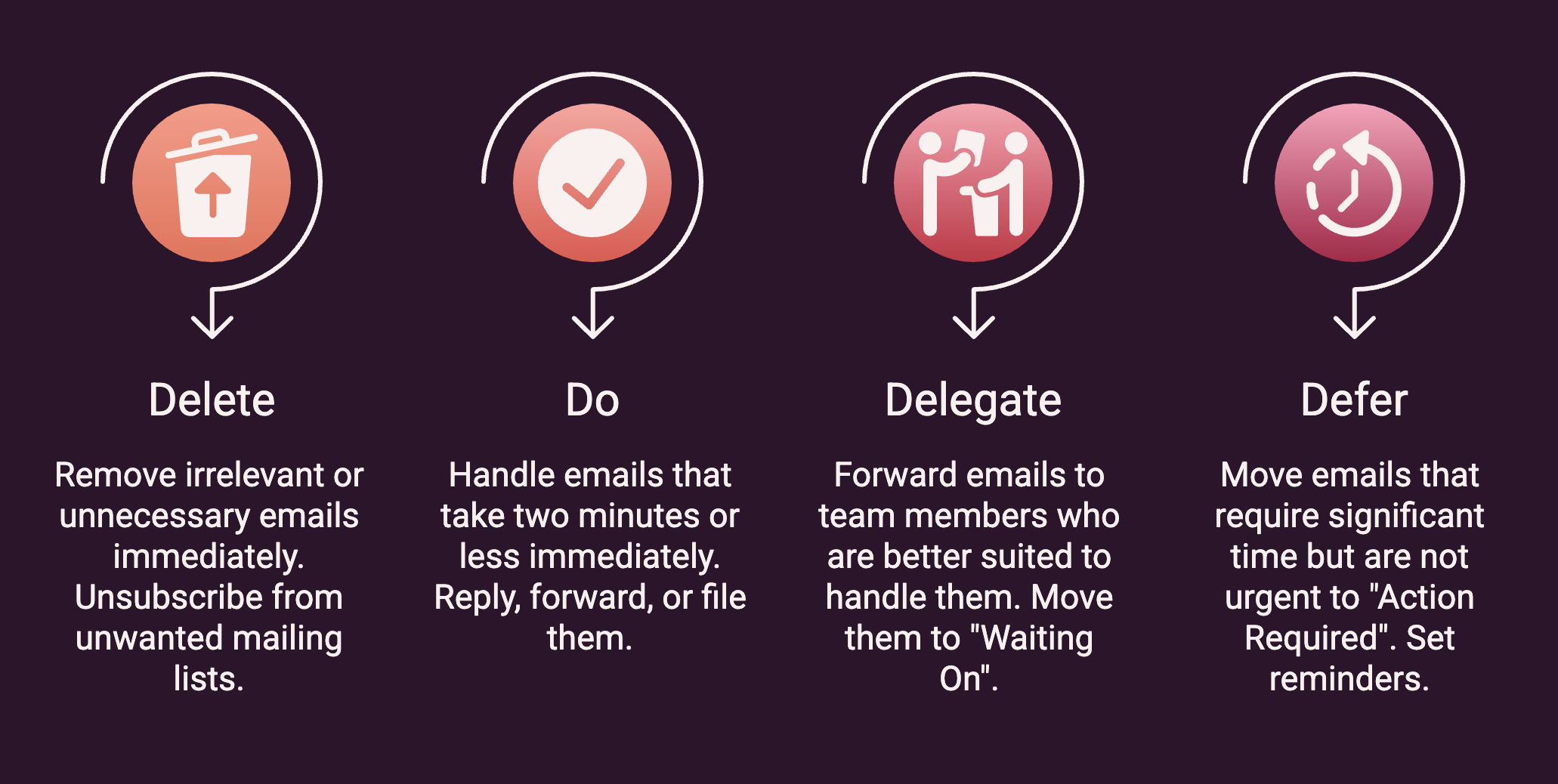 Every email that lands in your inbox needs a decision. The Four Ds framework helps you make that decision quickly, so unread messages do not pile into visual clutter and unfinished business.
Delete. If it is irrelevant, resolved, or one of the many unnecessary emails that arrive uninvited, delete it immediately. Old messages from completed email threads, group announcements that do not concern you, and unwanted emails that require no further action all go here. Make a habit of unsubscribing from promotional emails and mailing lists you consistently ignore. That reduces incoming emails at the source rather than forcing you to manage the same email clutter every day. Not every email needs a reply, and treating silence as an option is part of Delete. A read receipt, or no response at all, is a perfectly acceptable outcome for a company-wide announcement or an FYI thread that does not require action from you. Reserve your replies for messages that genuinely need one.
Do. If the email can be handled in two minutes or less, take immediate action now. Reply, forward, or file it and move on. Unread emails left for later accumulate into a backlog that is harder and more time-consuming to clear than if you had dealt with them in the moment.
Delegate. If a team member is better placed to handle it, forward it with a clear instruction and move it to Waiting On. In shared inboxes, important messages often go unactioned because ownership is unclear. A simple delegate-and-move habit fixes that and supports better team collaboration.
Defer. If the email needs significant time but is not urgent, move it to Action Required and set reminders. Use Outlook’s snooze feature to bring it back at the right moment. Defer does not mean ignore; it means you have made a conscious decision to deal with it at a scheduled time.
Applied consistently during your dedicated email blocks, the Four Ds turn email triage from a reactive process into a deliberate one. Fewer missed deadlines, fewer follow-ups, and a much more organised inbox at the end of each day.
Step 5: Reduce What Is Coming In
The most effective long-term inbox management strategy is reducing the volume of incoming emails before they arrive.
Start with personal email hygiene. Use a separate email address, a personal email account kept entirely apart from your work address, for online sign-ups, subscriptions, and non-work registrations. This alone removes a significant source of email clutter from your professional inbox without any ongoing effort.
Within your team, agree on which communication tools are appropriate for each situation. Multiple emails back and forth to answer a quick question is a waste of everyone’s time. An instant message or a short call resolves the issue in a fraction of the time and prevents email threads from multiplying unnecessarily. When you do need to schedule meetings or send calendar invites, do so directly in Outlook or your calendar tool rather than via a long email thread.
Use email templates for responses you write repeatedly. Acknowledgement of receipt, standard project updates, common enquiries, and a ready template mean faster replies, fewer follow-ups, and more consistent, professional communication across your team. Outlook’s Quick Parts and My Templates functions make this straightforward to set up and save significant time over the course of a week.
Clear, specific subject lines also reduce the volume of multiple emails generated by unclear communication. When recipients understand immediately what a message is about and what action is needed, they can respond faster and with fewer back-and-forth follow-ups. Group and CC threads are one of the biggest sources of email you don’t need. If you’re copied into a thread that doesn’t concern your role, it’s reasonable to ask the sender to remove you. This one small habit, repeated across a team, meaningfully cuts the volume landing in everyone’s inbox.
The Problem Most Inbox Advice Ignores
Individual habits matter. But if email overload is a persistent problem across your organisation, fixing your own inbox is only part of the answer.
The deeper issue is cultural. Emails get sent when a call would do. Everyone is CC’d by default. Nobody has agreed on what requires a reply, how quickly, or whether to acknowledge receipt. One person managing their individual inbox better does not change any of that, nor does it improve team productivity at an organisational level.
What actually shifts things is a shared system. When multiple team members manage emails the same way, the same folder structure, the same email routine, the same response norms- volume drops, important messages stop falling through the cracks, and missed deadlines due to inbox clutter become far less common. Individual inboxes become easier to manage when the team around them operates consistently.
This is where professional development pays off beyond personal habit change. Priority Management’s Working Sm@rt with Microsoft Outlook program works with teams to build a shared email management system across an organisation. It is not a course about tips; it is a structured approach to changing how a team communicates. Participants save an average of 54 minutes per day, based on Priority Management’s own program outcomes across Australian clients.
Take Back Your Day
 Most people do not have an email problem. They have a system problem.
Stop using your inbox as a to-do list. Build an email routine and stick to it. Create folders that reflect what needs to happen, not just what arrived. Apply the Four Ds to manage emails consistently. And reduce incoming mail at the source so you are not fighting the same battle every day.
Effective email management is not about spending more time in your inbox. It is about spending less while ensuring every message gets the appropriate action at the right time. Keep your inbox organised, keep your team aligned on how to communicate, and the time savings follow.
To find out how Priority Management can deliver inbox management training in-house for your team, call 1300 187 203 or visit our website to learn more about the Working Sm@rt with Microsoft Outlook program.
Frequently Asked Questions
How many times a day should I check my email at work?
Two to three times suits most roles. Morning after your first task, around midday, and late afternoon. Outside those windows, turn off email notifications and focus on the work that needs your full attention. If your role genuinely requires faster turnaround, adjust the frequency, but batch your checking regardless. Constant monitoring costs more time than it saves and makes it much harder to manage emails with any real system.
What is inbox zero?
Inbox zero is an email management approach where every message receives a clear decision rather than sitting unread in your inbox. It does not mean your inbox is literally empty at the end of every day. It means nothing stays unresolved indefinitely. Every email is deleted, done, delegated, or deferred. Think of it as an email routine rather than a daily target.
How do I create folders that actually work in Outlook?
Keep it to five action-based folders: Action Required, Waiting On, Reference, Read Later, and Archive. Create folders based on what needs to happen next, not what the email is about. Add sub-folders only where genuinely necessary. Then set up Outlook Rules to automatically categorise emails into those folders as they arrive, so you don’t have to manually sort every incoming message.
Why does my inbox still feel overwhelming even when I try to stay on top of it?
Because effort without a system does not work. Without an email routine, a folder structure, and a decision framework like the Four Ds, incoming emails pile up faster than they can be processed no matter how much time you put in. The approach is the issue, not the effort. An organised inbox is the result of a consistent email system, not harder work.